
10 Best Audio Interfaces – Top Picks for 2026
Every great home recording starts at the audio interface. This small box is the bridge between your microphones, guitars and instruments and your computer, and its preamps, converters and drivers decide how clean and clear your recordings sound. Whether you are laying down vocals, producing beats or starting a podcast, choosing the right audio interface is the single most important gear decision for your studio. This audio interfaces guide brings together everything you need to choose with confidence.
We have rounded up the ten best audio interfaces you can buy right now, from budget friendly two channel units to premium Thunderbolt models with onboard DSP. Every pick has been judged on preamp quality, converter clarity, driver stability, latency, features and overall value for money. Whether you are a solo singer songwriter, an electronic producer, a podcaster or a guitarist building your first home studio, there is an interface here that matches your workflow. Whatever your recording plans and budget, this guide will help you find the interface that fits.
1. Focusrite Scarlett 2i2

The Focusrite Scarlett 2i2 is the best selling audio interface in the world, and the fourth generation keeps it at the top of the pile. Two upgraded Scarlett mic preamps deliver clean, detailed recordings with 120dB of dynamic range, while the new Auto Gain feature sets perfect input levels at the touch of a button. The Air mode adds a gentle high frequency lift inspired by classic Focusrite console preamps, sweetening vocals and acoustic guitars beautifully.
For shoppers comparing the best audio interfaces this year, Focusrite Scarlett 2i2 deserves a place on the shortlist.
For anyone shortlisting the best audio interfaces, Focusrite Scarlett 2i2 is well worth a closer look.
Dynamic Gain Halos around the gain knobs show your input level at a glance, so clipping becomes almost impossible. It records at up to 24 bit and 192kHz, runs over USB-C with very low latency, and includes a generous software bundle with Ableton Live Lite and Pro Tools Intro. For solo artists and small home studios, this is the interface to beat, offering professional sound quality at a very reasonable price.
Key features:
- Two 4th Gen Scarlett mic preamps with 120dB dynamic range
- Auto Gain and Clip Safe for perfect levels
- Air mode for classic console style brightness
- Up to 24 bit 192kHz recording over USB-C
- Dynamic Gain Halos for visual level feedback
- Ableton Live Lite and Pro Tools Intro included
Pros:
- Superb sound quality for the price
- Auto Gain makes setup effortless for beginners
- Excellent driver stability and low latency
Cons:
- Only two inputs, no room to grow
- No MIDI in or out
2. Universal Audio Apollo Twin X
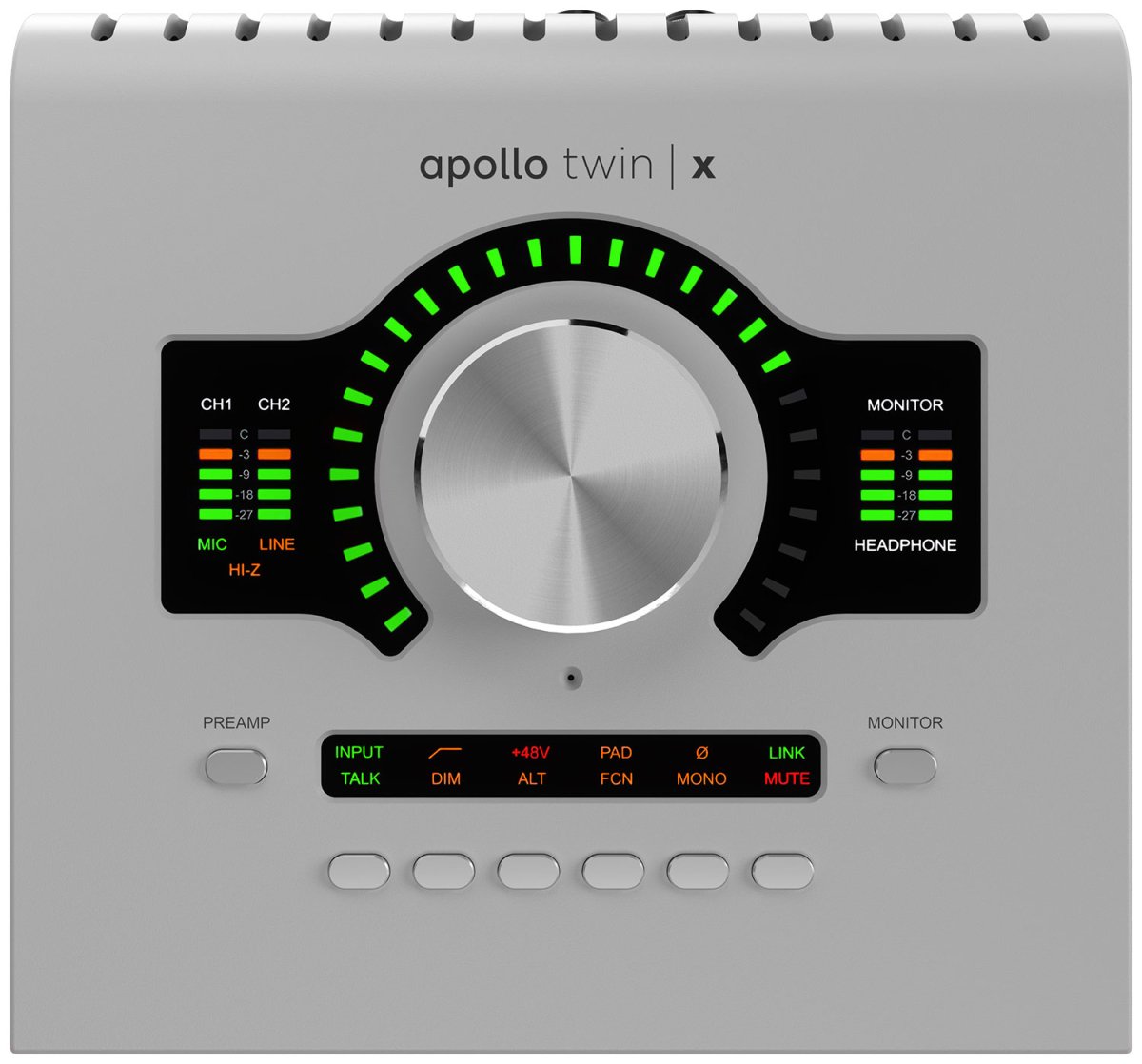
The Universal Audio Apollo Twin X is the professional choice for serious home studios. Its Unison preamps model legendary hardware like Neve and API consoles with stunning realism, and the onboard UAD DSP lets you record through vintage compressors, EQs and amp emulations with near zero latency. This is the sound of hit records, available on your desktop.
Overall, Universal Audio Apollo Twin X stands out as a dependable audio interfaces choice for everyday use.
Universal Audio Apollo Twin X earns its place as a trusted audio interfaces option in this roundup.
Conversion is elite level, with 127dB of dynamic range capturing every nuance of a performance. The Thunderbolt 3 connection keeps round trip latency vanishingly low even in large sessions, and the included Heritage Edition plugin bundle gives you dozens of world class emulations from day one. It costs considerably more than USB rivals, but for producers who want the best possible front end, nothing else at this size competes.
Key features:
- Two Unison mic preamps with classic hardware modelling
- UAD DSP for near zero latency plugin recording
- 127dB dynamic range elite conversion
- Thunderbolt 3 connectivity for ultra low latency
- Heritage Edition bundle of UAD plugins included
- Talkback mic and monitor control built in
Pros:
- Reference grade preamps and conversion
- Record through vintage gear emulations live
- Superb build quality and monitoring features
Cons:
- Premium price, Thunderbolt only
- Plugin ecosystem can become expensive
3. Focusrite Scarlett Solo

The Focusrite Scarlett Solo is the simplest way to start recording properly. One XLR mic input and one instrument input are all most beginners need, and the 4th Gen Scarlett preamp captures vocals and guitar with the same clean quality as the bigger models in the range. Auto Gain and Clip Safe make it almost impossible to ruin a take, which is ideal when you are learning.
If audio interfaces quality is your top priority, Focusrite Scarlett Solo is easy to recommend.
When it comes to reliable audio interfaces, Focusrite Scarlett Solo consistently gets high marks from owners.
Despite its size and price, it records at up to 24 bit and 192kHz, includes the Air mode for extra sparkle, and ships with the same software bundle as its bigger siblings. The compact metal chassis fits easily in a laptop bag, making it perfect for mobile recording and songwriting on the move. If you record one source at a time, there is no better value entry point.
Key features:
- One 4th Gen Scarlett mic preamp and one instrument input
- Auto Gain and Clip Safe for easy levels
- Air mode for brighter recordings
- Up to 24 bit 192kHz over USB-C
- Compact, bus powered, portable design
- Ableton Live Lite and Pro Tools Intro included
Pros:
- Incredible value for beginners
- Same great preamp as the 2i2
- Tiny and travel friendly
Cons:
- Single mic input limits duets and stereo recording
- No MIDI connectivity
4. Audient iD14 MKII
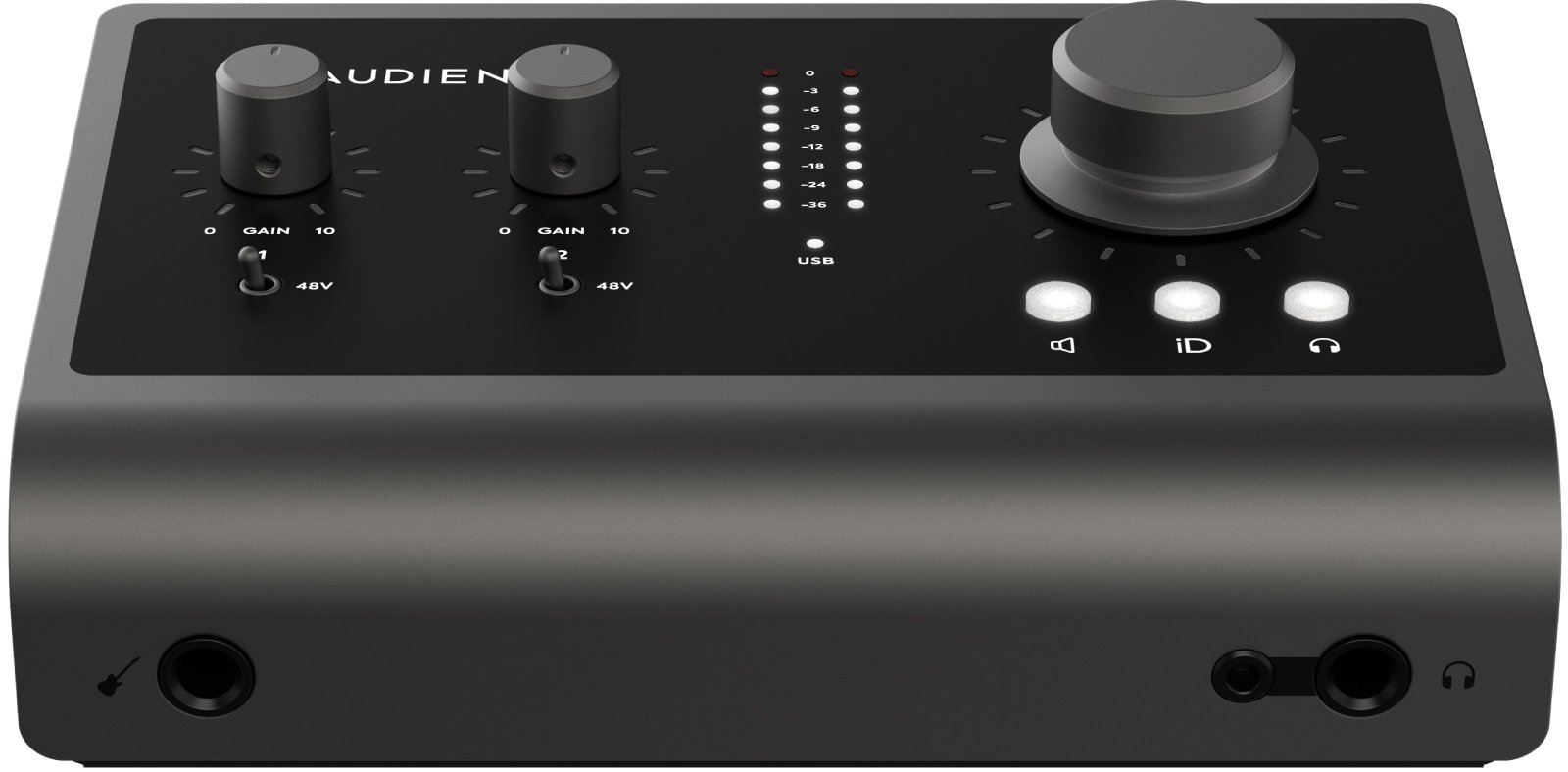
The Audient iD14 MKII brings genuine console heritage to the desktop. Its two Audient console mic preamps, the same design found in the ASP8024 console, deliver a warm, open sound that flatters everything from vocals to drums. With 126dB of dynamic range on the converters, recordings are detailed and spacious, rivalling interfaces that cost twice as much.
Among this year’s audio interfaces options, Audient iD14 MKII offers a strong balance of quality and value.
Buyers who want proven audio interfaces performance will find a lot to like in Audient iD14 MKII.
The clever ScrollControl mode turns the big monitor knob into a virtual scroll wheel for your DAW, and the dual headphone outputs with independent volume are handy for recording with a friend. It offers ten inputs via optical expansion, so the iD14 MKII can grow with your studio rather than being replaced. For singer songwriters and producers who prize preamp quality above all, this is a standout.
Key features:
- Two Audient console mic preamps
- 126dB dynamic range on the converters
- 10 inputs via optical expansion
- ScrollControl DAW control from the volume knob
- Two independent headphone outputs
- USB-C with low latency drivers
Pros:
- Console grade preamps at a project studio price
- Expandable to ten inputs
- Excellent headphone amplification
Cons:
- Software mixer has a learning curve
- No onboard DSP effects
5. MOTU M2

The MOTU M2 punches far above its weight with measurement beating specs and a full colour LCD level meter that makes gain staging a joy. Its ESS Sabre32 Ultra converters deliver 120dB of dynamic range, putting its clarity on par with interfaces costing several times more. Individual preamp gain, monitor mix and phantom power controls keep everything within easy reach on the front panel.
MOTU M2 remains one of the most popular audio interfaces picks with buyers.
MOTU M2 rounds out our audio interfaces selection as a solid all round performer.
Loopback channels make it excellent for podcasters and streamers who need to mix computer audio with microphones, and the class compliant USB-C connection works with Mac, PC and even iOS devices. The sturdy metal chassis feels built to last, and MOTU drivers are famously stable. For under typical mid range prices, the M2 is one of the smartest purchases in home recording.
Key features:
- ESS Sabre32 Ultra converters with 120dB dynamic range
- Full colour LCD input and output metering
- Two mic line instrument combo inputs
- Loopback for podcasting and streaming
- USB-C, compatible with Mac, PC and iOS
- Individual 48V phantom power per channel
Pros:
- Outstanding measured audio performance
- Great metering and monitoring controls
- Very stable drivers
Cons:
- Software bundle is modest
- No MIDI in or out
6. PreSonus AudioBox USB 96

The PreSonus AudioBox USB 96 has been a beginner favourite for years, and it remains one of the most affordable ways to start a home studio. Two Class A mic preamps with 48V phantom power handle vocals and instruments cleanly, while MIDI in and out let you connect keyboards and controllers without a separate interface. It is a complete starter package in a tough steel chassis.
For anyone shortlisting the best audio interfaces, PreSonus AudioBox USB 96 is well worth a closer look.
For shoppers comparing the best audio interfaces this year, PreSonus AudioBox USB 96 deserves a place on the shortlist.
The included Studio One Artist DAW and Studio Magic plugin suite mean you can record, edit and mix a finished song with nothing else to buy. The simple mixer knob blends direct input with playback for latency free monitoring while tracking. It will not match premium interfaces for converter clarity, but at this price it gets you recording music that sounds genuinely good.
Key features:
- Two Class A mic preamps with 48V phantom power
- MIDI in and out for keyboards and controllers
- 24 bit 96kHz recording over USB
- Mixer knob for zero latency monitoring
- Studio One Artist DAW included
- Rugged steel chassis
Pros:
- Very affordable complete starter package
- MIDI connectivity at a budget price
- Generous software bundle
Cons:
- Older USB connection and driver design
- Preamps are decent rather than outstanding
7. Solid State Logic SSL2
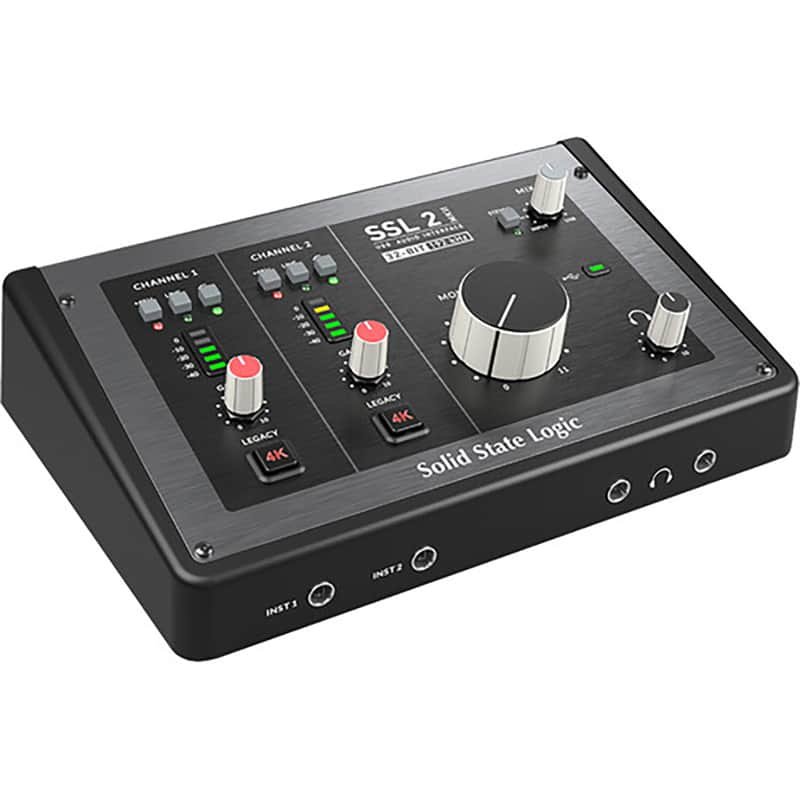
The Solid State Logic SSL2 puts the sound of one of the most famous console brands in history on your desk. Its Legacy 4K button adds the harmonic character of the classic SSL 4000 series console to your recordings, giving vocals and drums instant analog warmth and presence. The mic preamps themselves are clean, quiet and detailed, with a huge 62dB of gain for demanding microphones.
Solid State Logic SSL2 earns its place as a trusted audio interfaces option in this roundup.
Overall, Solid State Logic SSL2 stands out as a dependable audio interfaces choice for everyday use.
Build quality is superb, with an aluminium chassis and satisfyingly solid knobs that feel a class above the price. The monitor mix control, dual headphone outputs and balanced monitor outputs cover all the essentials for a small studio. If you want your recordings to carry a hint of that legendary British console magic, the SSL2 delivers it beautifully.
Key features:
- Legacy 4K analog console enhancement per channel
- High quality mic preamps with 62dB of gain
- 24 bit 192kHz AKM converters
- Monitor mix and dual headphone outputs
- Solid aluminium chassis
- SSL Production Pack software bundle
Pros:
- Genuine SSL console character on tap
- Superb build quality
- Clean, detailed preamps
Cons:
- No MIDI in or out
- Only two inputs
8. Behringer U-Phoria UMC22
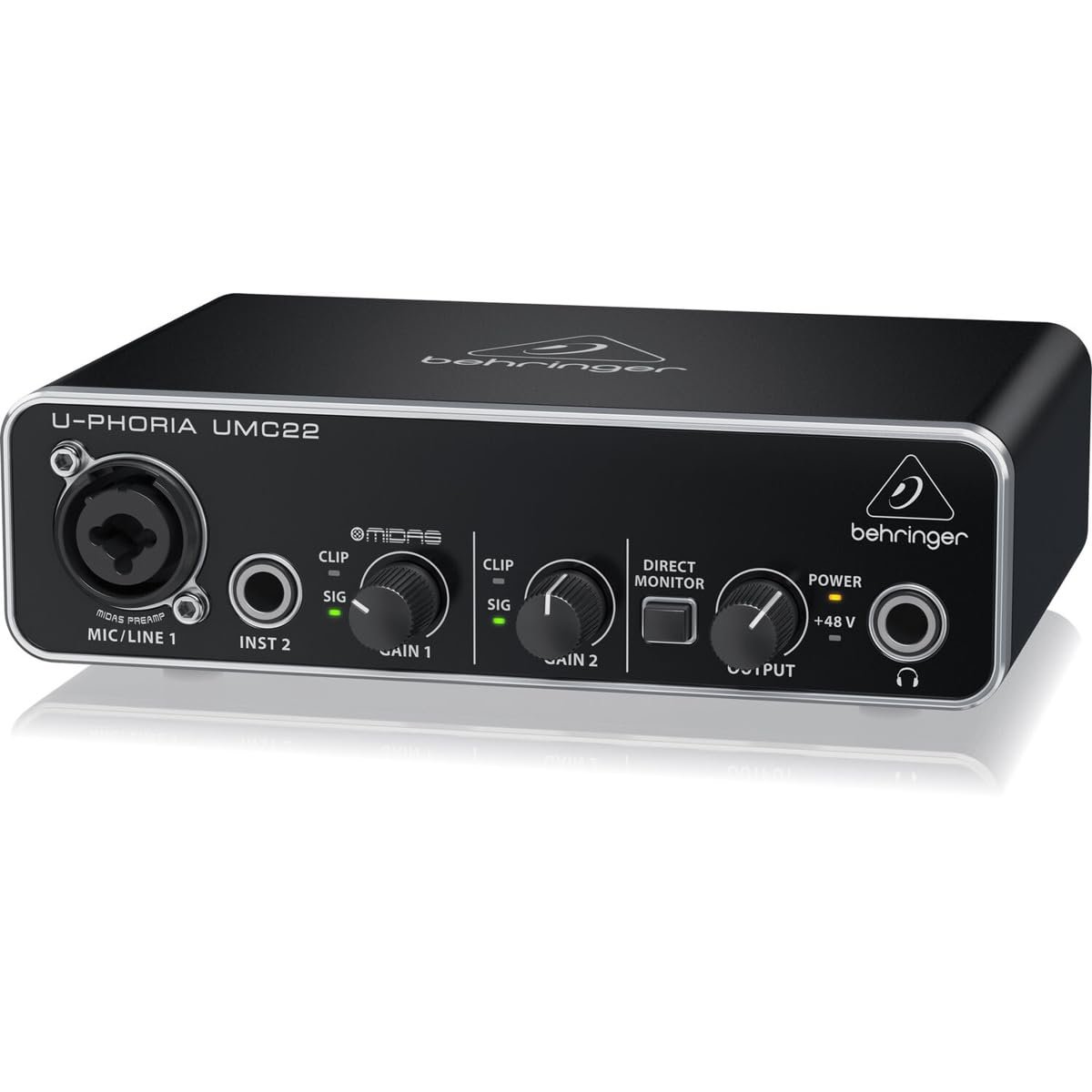
The Behringer U-Phoria UMC22 is proof that you do not need to spend much to start recording. Its MIDAS designed mic preamp captures surprisingly clean vocals for the price, and the instrument input handles guitar and bass directly. For absolute beginners and podcasters on the tightest budgets, it removes every excuse not to start.
When it comes to reliable audio interfaces, Behringer U-Phoria UMC22 consistently gets high marks from owners.
If audio interfaces quality is your top priority, Behringer U-Phoria UMC22 is easy to recommend.
Operation is beautifully simple, with dedicated gain knobs, signal and clip LEDs, a direct monitor button and a headphone output. It is USB powered, works with all major DAWs, and includes a basic software bundle to get you going. Audiophiles will eventually want more, but as a first interface it is unbeatable value.
Key features:
- MIDAS designed mic preamp with 48V phantom power
- Instrument input for guitar and bass
- 48kHz recording resolution
- Direct monitor for latency free tracking
- Signal and clip LED indicators
- USB powered, compact metal housing
Pros:
- Extremely affordable entry point
- Simple, beginner friendly layout
- Decent sound quality for the price
Cons:
- Limited to 48kHz resolution
- Basic software bundle
9. Native Instruments Komplete Audio 2
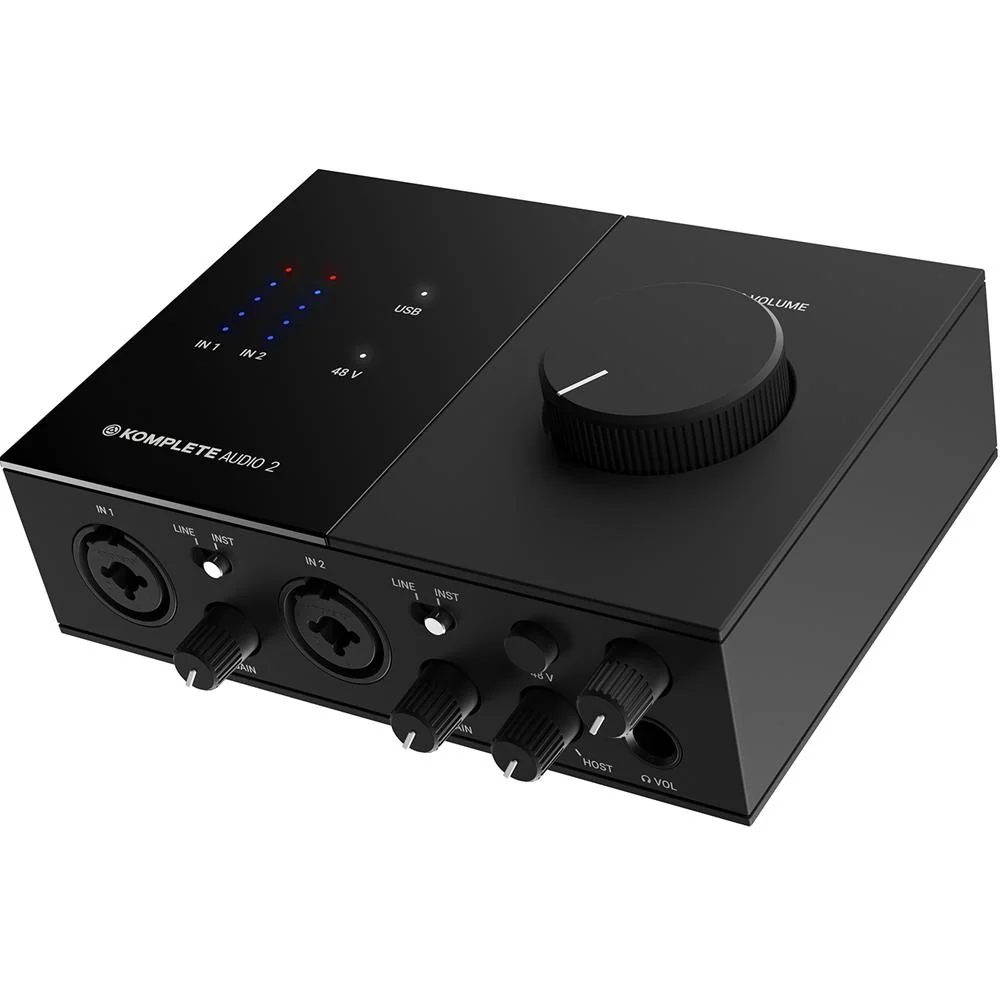
The Native Instruments Komplete Audio 2 is designed for electronic music producers, with a sleek top panel dominated by a large volume knob and clear LED input metering. The two combo inputs handle microphones, line sources and instruments, and the sound quality is clean and punchy with low latency drivers that keep virtual instruments responsive.
Buyers who want proven audio interfaces performance will find a lot to like in Native Instruments Komplete Audio 2.
Among this year’s audio interfaces options, Native Instruments Komplete Audio 2 offers a strong balance of quality and value.
Where it really shines is the software bundle. It includes MASCHINE Essentials, a selection of KOMPLETE instruments and effects, and Ableton Live Lite, giving beat makers an instant production toolkit. The big volume knob doubles as a controller in some software, and the rugged design survives life in a gig bag. For producers living in the Native Instruments ecosystem, it is a natural fit.
Key features:
- Two combo inputs for mic, line and instrument
- Large top mounted volume knob
- LED input metering on the top panel
- Low latency drivers for virtual instruments
- MASCHINE Essentials and KOMPLETE instruments included
- Ableton Live Lite included
Pros:
- Excellent software bundle for producers
- Stylish, practical top panel design
- Great for electronic music workflows
Cons:
- No MIDI in or out
- Headphone amp is adequate rather than powerful
10. Steinberg UR22C
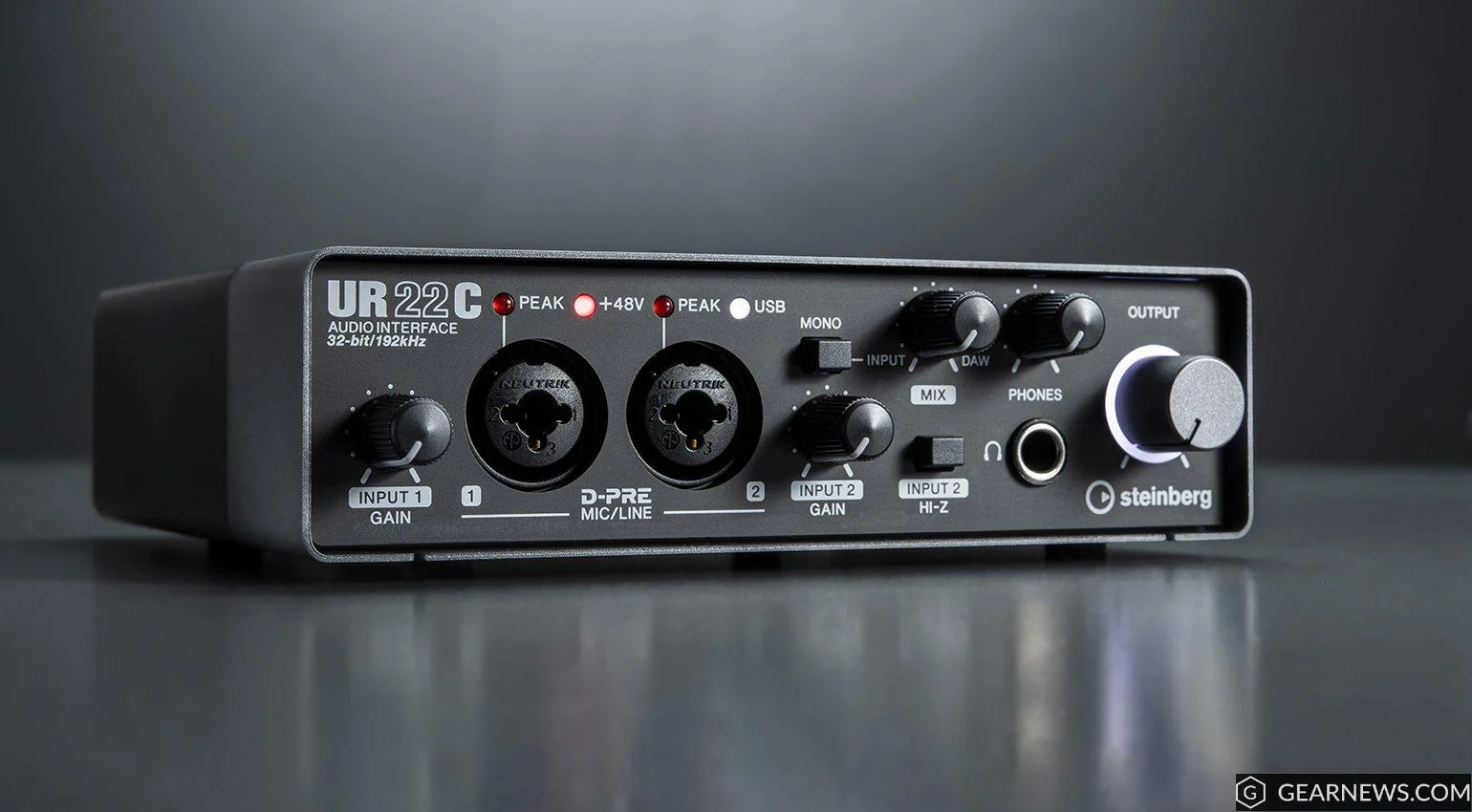
The Steinberg UR22C is a rock solid interface from the makers of Cubase, and the integration shows. It ships with Cubase AI and Cubasis LE, so Cubase users get a seamless recording setup out of the box. The D-PRE mic preamps are clean and musical, and 32 bit integer recording gives enormous headroom that forgives level setting mistakes.
Steinberg UR22C rounds out our audio interfaces selection as a solid all round performer.
Steinberg UR22C remains one of the most popular audio interfaces picks with buyers.
The dspMixFx software provides latency free monitoring with built in REV-X reverb and channel strip effects, which singers love while tracking. MIDI in and out, a sturdy metal chassis and USB-C connectivity round out a package that feels thoroughly professional. If Cubase is your DAW, the UR22C is the most natural interface choice.
Key features:
- Two D-PRE Class A mic preamps
- 32 bit integer recording resolution
- dspMixFx with latency free effects monitoring
- MIDI in and out
- Cubase AI and Cubasis LE included
- Rugged metal chassis with USB-C
Pros:
- Perfect partner for Cubase users
- Built in reverb and effects for monitoring
- 32 bit recording gives huge headroom
Cons:
- Software control panel can be fiddly
- Design is functional rather than beautiful
Buying Guide: How to Choose the Best Audio Interfaces
How many inputs do you need. Count the sources you will record at the same time. One input covers a solo vocalist or podcaster, two handle vocals plus guitar or a stereo keyboard, and four or more suit bands and multi mic drum recording. Buy slightly more than you need today to avoid replacing the unit later.
Preamps and converters. The mic preamp shapes your recorded tone, so this is where quality matters most. Look for clean, low noise preamps with enough gain for your microphones, and converters with at least 110dB of dynamic range for detailed, spacious recordings.
Latency and drivers. Low latency lets you monitor through effects while recording without distracting delay. Interfaces with well written drivers, Thunderbolt models, or onboard DSP like the Apollo Twin X give the most responsive performance.
Connectivity. USB-C suits almost everyone and works with Mac, PC and tablets. Thunderbolt offers the lowest latency for demanding sessions but needs a compatible computer. Check for MIDI in and out if you use hardware synths or controllers.
Monitoring features. Direct monitoring lets you hear yourself with zero delay while tracking. Dual headphone outputs, monitor mix controls and talkback are valuable extras for recording with others.
Software bundle. Most interfaces include a DAW and plugins, which can save you a lot of money as a beginner. Focusrite, PreSonus, Steinberg and Native Instruments all bundle genuinely useful software with their interfaces.
Budget. Great recordings are possible at every price. Budget units like the Behringer UMC22 get you started, mid range models like the Scarlett 2i2 and MOTU M2 cover most home studios brilliantly, and premium interfaces like the Apollo Twin X reward serious producers.
Keep researching the best audio interfaces with our related guides to the best acoustic guitars and best electric guitars. For useful background on audio interfaces, the Musical instrument on Wikipedia article is worth a read.
In a hurry? Here is the bottom line on audio interfaces: choose a proven audio interfaces brand, match the audio interfaces to your needs, and do not overpay for audio interfaces features you will never use. Every audio interfaces pick above clears that bar.
Frequently Asked Questions
What does an audio interface do? For more detail on audio interfaces, see the buying guide above.
An audio interface converts analog signals from microphones and instruments into digital audio your computer can record, and converts digital audio back to analog for your speakers and headphones. It also provides mic preamps, phantom power and low latency monitoring. For more detail on audio interfaces, see the buying guide above.
Do I need an audio interface to record music?
If you want to record microphones, guitars or any external instrument with good quality, yes, an interface is essential. USB microphones work without one, but a dedicated audio interface gives you better preamps, lower latency, proper monitor outputs and the flexibility to use any microphone. For serious recording, podcasting or music production, it is the single most important piece of studio gear.
How many inputs do I need?
One input is enough for solo vocals or podcasting, while two inputs cover a singer songwriter recording vocals and guitar together. Choose four or more inputs if you record bands, drums or multiple podcast guests at once. It is wise to buy slightly more inputs than you need today, so your interface can grow with your studio instead of needing replacement.
What is phantom power?
Phantom power is 48V of electrical power sent through the mic cable to power condenser microphones, which need it to operate their internal electronics. It is switched on per channel on your audio interface, usually with a clearly labelled button. Dynamic microphones do not need phantom power and are unaffected by it, so you can leave it on safely with them connected.
Is USB or Thunderbolt better for audio interfaces?
USB-C is the best choice for most home studios. It works with any modern computer, offers low enough latency for comfortable tracking, and costs less. Thunderbolt provides even lower latency and suits professionals running large sessions with many channels and plugins.
Conclusion
The best audio interfaces for your home studio depend on what you record and how seriously you take it. For most home studios, the Focusrite Scarlett 2i2 remains the benchmark, with the MOTU M2 and Audient iD14 MKII offering superb alternatives at similar prices. Beginners should start with the Scarlett Solo or the astonishingly affordable Behringer UMC22, while Cubase users will love the Steinberg UR22C and electronic producers the Native Instruments Komplete Audio 2. If you want the finest front end money can buy at this size, the Universal Audio Apollo Twin X is in a class of its own.
Whichever you choose, a good interface removes the technical barriers between you and your music. Plug in, set your levels, and start recording.
In short, the best audio interfaces is the one that fits your needs and budget. Use the reviews above to compare the leading audio interfaces options side by side, then pick the audio interfaces that you will enjoy using for years to come.
